from classifai.vectorisers import HuggingFaceVectoriserVectorStore pre- and post- processing with Hooks 🪝
Overview
This notebook provides a guide on how to use pre- and post-processing ‘hooks’ to simplify additional tasks you may have around input sanitisation / standardisation, result aggregation, auto-coding, linking in external datasets, etc.
Hooks operate on the input and output dataclasses of each of our VectorStore methods, and the key requirement for them is that each will output an object of the same dataclass that it received. This allows hooks to be ‘chained’, allowing more complex pre-/post-processing tasks to be split into discrete steps, each defined by its own hook.
Hooks provide a way to modify the data flow of the ClassifAI package, to facilitate tasks such as:
- Removal of punctuation from input queries before the
VectorStoresearch process begins, - Standardising capitalisation of all text in an input query to the
Vectorstoresearch process, - Deduplicate results based on the doc_label column so that duplicate knowledgebase entries are not returned,
- Prevention of users from retrieving certain documents in your
VectorStore, - Removing hate speech from any input text.
There are three main ways of using hooks;
- Using one of the
default_hookswe provide as part of ClassifAI, - Defining your own callable function,
- Extending the abstract
HookBaseclass to create a custom, flexible hook with implicit validation.
Key Sections:
- Recap: How the dataclasses and data flow works for interactions with the VectorStore,
- Using Hooks: Introduction to defining and using your own hooks for different tasks,
- Default Hooks: Introduction to using the more flexible hooks provided by ClassifAI for common tasks,
- Extending the
HookBaseclass: Make your own custom flexible hook.
Recap of VectorStore Dataclasses
The majority of the following points are already covered in the recommended first notebook demo, general_workflow_demo.ipynb. If you are unfamiliar with the package you may wish to work through this demo first, in order to better understand the VectorStore object and its’ methods and dataclasses.
ClassifAI uses Pandas dataframe-like dataclasses to specify what data need to be passed as input to the VectorStore methods/functions, and what data can be expected to be returned by those methods
The VectorStore class, responsible for performing different actions with your data, has three key methods/functions:
search()- Takes in a body of text and searches the vector store for semantically similar knowledgebase samples.
reverse_search()- Takes in document labels and searches the vector store for entries with those labels.
embed()- Takes in a body of text and uses the vectoriser model to convert the text into embeddings.
For each of these three core methods, we have created an input dataclass and an output dataclass. These dataclasses define pandas-like objects that specify what data needs to be passed to each method and also perform runtime checks to ensure you’ve passed the correct columns in a dataframe to the appropriate VectorStore method.
For example, the figure below illustrates the input and output dataclasses of the VectorStore.search() method:
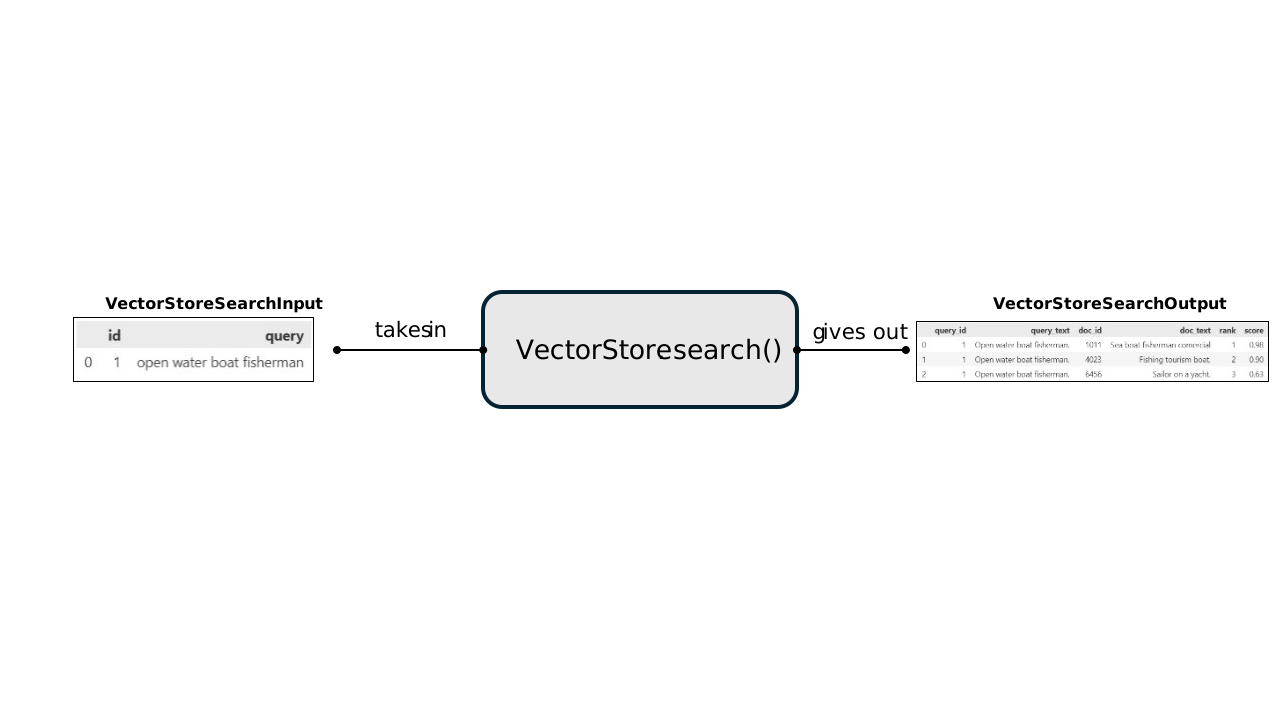
This shows that the VectorStore.search() method expects: - An input dataclass object with columns [id, query]. - To output an output dataclass object with columns [query_id, query_text, doc_label, doc_text, rank, score].
The reverse_search() and embed() VectorStore functions have their own input and output data classes with their own validity column data checks. The names of each set are intuitively:
| VectorStore Method | Input Dataclass | Output Dataclass |
|---|---|---|
VectorStore.search() |
VectorStoreSearchInput |
VectorStoreSearchOutput |
VectorStore.reverse_search() |
VectorStoreReverseSearchInput |
VectorStoreReverseSearchOutput |
VectorStore.embed() |
VectorStoreEmbedInput |
VectorStoreEmbedOutput |
Hooks and custom dataflows
‘Hooks’ allow users to manipulate the content of ClassifAI dataclass objects as they enter or leave the VectorStore.
The requirements for a hook are:
- To be callable (e.g. a function),
- To accept one input parameter, which is an instance of a dataclass,
- To output a valid instance of the same type.
For example: you might want to preprocess the input to the VectorStore.search() method to remove punctuation from the texts:
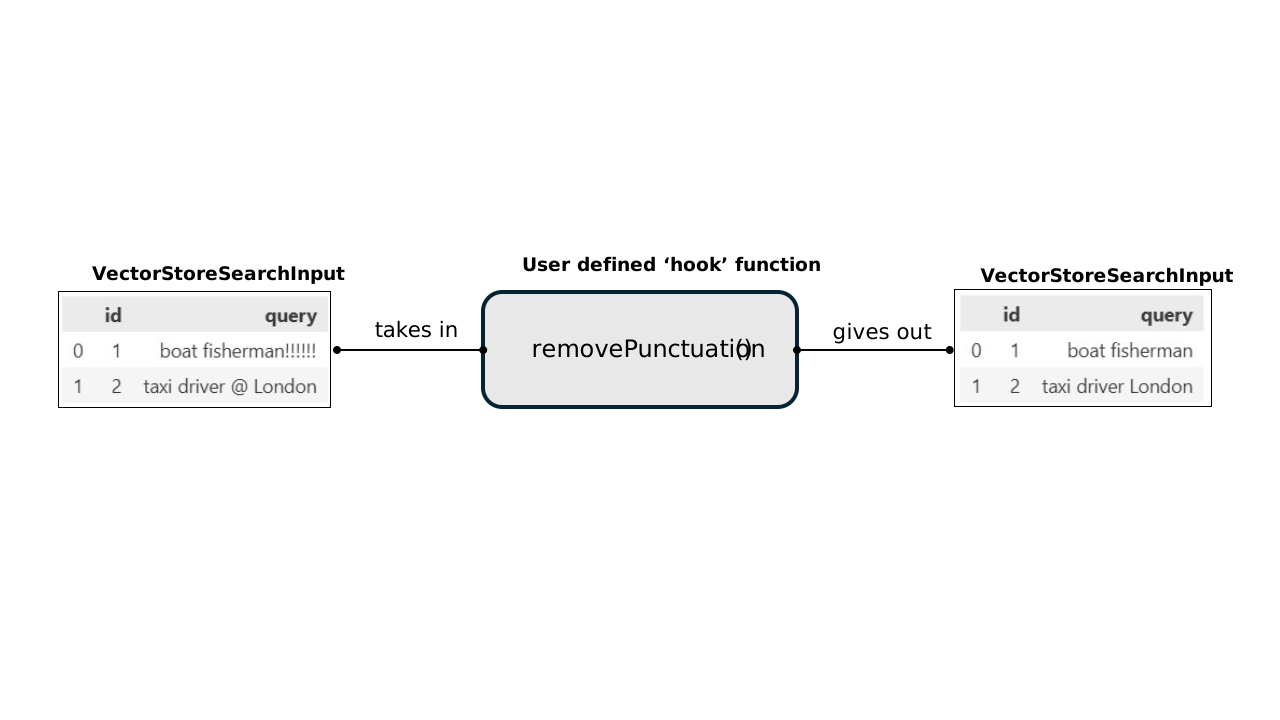
Hooks can be attached to a VectorStore to run every time the VectorStore search method is called. You can also apply other hooks to other dataclasses and their respective VectorStore methods and chain togtether these custom operations that manipulate the input and output dataclasses of the VectorStore methods.
For example, implmenting 2 hooks for the input and output dataclasses of the VectorStore search method would provide a dataflow:

Using Hooks
In this section, we’ll define a custom data sanitisation function which removes punctuation from input user queries, and attach it to a VectorStore as a search pre-processing hook.
Demo Data
This demo uses a mock dataset that is freely available on the ClassifAI repo, if you have not downloaded the entire DEMO folder to run this notebook, the minimum data you require is the DEMO/data/testdata.csv file, which you should place in your working directory in a DEMO folder - (or you can just change the filepath later in this demo notebook)
Also ensure you have installed the [huggingface] optional dependency set, as described in the DEMO/README.md.
Defining a custom hook:
Hooks can be quite simple functions, all they need to do is accept a single dataframe-like input (a classifai.indexers dataclass), and output an object of the same type. To make sure your output is valid at the end, we recommend using the input object’s class’ .validate() method.
One example of where we may want to define a custom hook is to strip punctuation from some input text in a search() query; we’ll now show a short worked example to implement this with a custom hook function.
We’ll name our hook remove_punctuation(), and define it like this:
import string

from classifai.indexers.dataclasses import VectorStoreSearchInput


def remove_punctuation(input_data: VectorStoreSearchInput) -> VectorStoreSearchInput:
    # we want to modify the 'texts' field in the input_data pydantic model, which is a list of texts
    # this line removes punctuation from each string with list comprehension
    sanitised_texts = [x.translate(str.maketrans("", "", string.punctuation)) for x in input_data["query"]]
    input_data["query"] = sanitised_texts
    # Return the dictionary of input data with desired modified values at each desired key
    return input_data.__class__.validate(input_data)
Now we attach it to a VectorStore:
from classifai.indexers import VectorStore

vectoriser = HuggingFaceVectoriser(model_name="sentence-transformers/all-MiniLM-L6-v2")

my_vector_store = VectorStore(
    file_name="data/fake_soc_dataset.csv",
    data_type="csv",
    vectoriser=vectoriser,
    overwrite=True,
    hooks={"search_preprocess": remove_punctuation},
)
Now if we search some query against the VectorStore we created, punctuation should be stripped from the query before it is converted to a vector and searched against the knowledgebase:
from classifai.indexers.dataclasses import VectorStoreSearchInput

input_data = VectorStoreSearchInput({"id": [1], "query": ["a fruit and vegetable farmer!!!"]})

my_vector_store.search(input_data, n_results=5)
Default Hooks
ClassifAI provides hooks out-of-the-box for some common tasks, which may speed up your development substantially.
We’ll briefly cover two of these here;
- A
CapitalisationStandardisingHookwhich can be operate on anyInputVectorStoredataclass, - A
DeduplicationHookwhich operates on theVectorStoreSearchOutputdataclass.
from classifai.indexers.hooks.default_hooks import CapitalisationStandardisingHook, DeduplicationHook

# This hook enforces standardisation of capitalisation for inputs, which helps improve matching for some vectorisers.
# You can specify the dataframe column (or list of columns) which this should apply to, and the method by which to
# standardise the text.
# The options for capitalisation standardisation are;
# - 'upper' LIKE THIS
# - 'lower' like this
# - 'sentence' Like this
# - 'title' Like This
cap_hook = CapitalisationStandardisingHook(method="upper", colname="query")

# This hook replaces several VectorStore matches with the same label with the single 'best' one for a given query.
# You can control how this deduplication is reflected in the score via the score_aggregation_method parameter;
# - 'max' keep only the best individual match,
# - 'mean' keep the text and metadata of the best match, but recalculate the score as the mean of all retrieved matches for that label.
dedup_hook = DeduplicationHook(score_aggregation_method="max")


# This is a quick additional hook, which we will use to show how several hooks can be chained in a series for the same task
def quick_second_hook(df):
    df["test"] = 1
    return df
Now if we define a new VectorStore with these hooks, we can see them in action (and compare against the output of the previous VectorStore). Note also how you can use multiple hooks in a chain for the same task, by passing a list of hooks instead of a single hook.
my_vector_store_with_hooks = VectorStore(
    file_name="data/fake_soc_dataset.csv",
    data_type="csv",
    vectoriser=vectoriser,
    overwrite=True,
    hooks={
        "search_preprocess": cap_hook,
        "search_postprocess": [dedup_hook, quick_second_hook],
    },
)

# We define some input data to use for our comparison:
input_data = VectorStoreSearchInput({"id": [1], "query": ["a fruit and vegetable farmer!!!"]})
Output for our first VectorStore (which had the punctuation removal hook only):
my_vector_store.search(input_data, n_results=5)Note that in this case all five matches correspond to the same label.
Output for our new VectorStore, with multiple hooks - including the ClassifAI ‘default’ hooks:
my_vector_store_with_hooks.search(input_data, n_results=5)Extending the HookBase class
As well as the flexible hooks we provide for common tasks, we recognise that creating custom flexible callable hooks is not straightforward, due to the strict requirement that they can be called with a single input parameter which must be a VectorStore dataclass.
To make this more accessible, we offer an abstract HookBase class which underpins the other default hooks offered by ClassifAI. This base class acts as scaffolding to create a callable object which accepts additional configuration - as seen in the other default hooks.
from classifai.indexers.hooks import HookBaseAn extension of HookBase will have two methods;
__init__(), for setting attributes to be referred to later, and any other initial setup. It can take multiple arguments.__call__(), to perform the ‘hook’ action. It should accept only one argument, which is aVectorStoredataclass instance.
class MyCustomHook(HookBase):
    def __init__(self, new_col_name: str, new_col_value):
        self.new_col_name = new_col_name
        self.new_col_value = new_col_value

    def __call__(self, data):
        data[self.new_col_name] = self.new_col_value
        return data


my_custom_hook = MyCustomHook(new_col_name="test_col", new_col_value=12345)
Let’s test it out:
my_vector_store_with_custom_hook = VectorStore(
    file_name="data/fake_soc_dataset.csv",
    data_type="csv",
    vectoriser=vectoriser,
    overwrite=True,
    hooks={
        "search_postprocess": my_custom_hook,
    },
)

my_vector_store_with_custom_hook.search(input_data, n_results=5)
Adding Hooks to a VectorStore when loading from filespace
ClassifAI allows you to create your VectorStore once, and then persist it on local storage so that it can be reloaded for reuse later - without having to embed your knowledgebase again.
If you’ve followed through with the above code cells you may have noticed that every time we’ve instantiated a VectorStore it has saved a new folder to filespace (overwriting each time).
We can use the VectorStore.from_filespace() class method to load the VectorStore back into memory.
Important: any hooks you applied in previous sessions are not saved to the filespace. Instead, you must pass them in again via the hooks parameter, as in the original construction. There is no strict requirement to use the same hooks upon reloading, so if you want to update, add or remove hooks you don’t need to re-create your VectorStore from scratch.
# you can see we've reused the vectoriser and hooks from before
reloaded_vector_store = VectorStore.from_filespace(
    folder_path="./fake_soc_dataset/",  # YOU MAY NEED TO CHANGE THIS LINE TO THE CORRECT PATH
    vectoriser=vectoriser,
    hooks={
        "search_preprocess": remove_punctuation,
        "search_postprocess": quick_second_hook,
    },
)
reloaded_vector_store.search(input_data, n_results=5)
Injecting Data into our classification results with a hook
You may have some additional contextual information that you wanted to add in your pipeline. For example; some taxonomical definitions for the labels.
We may want to inject this extra information only after the search retrieval rather than store it as metadata in the knowledgebase; this can be achieved with a hook.
Here is some example taxonomy information for our test dataset:
official_id_definitions = {
    "101": "Fruit farmer: Grows and harvests fruits such as apples, oranges, and berries.",
    "102": "dairy farmer: Manages cows for milk production and processes dairy products.",
    "103": "construction laborer: Performs physical tasks on construction sites, such as digging and carrying materials.",
    "104": "carpenter: Constructs, installs, and repairs wooden frameworks and structures.",
    "105": "electrician: Installs, maintains, and repairs electrical systems in buildings and equipment.",
    "106": "plumber: Installs and repairs water, gas, and drainage systems in homes and businesses.",
    "107": "software developer: Designs, writes, and tests computer programs and applications.",
    "108": "data analyst: Analyzes data to provide insights and support decision-making.",
    "109": "accountant: Prepares and examines financial records, ensuring accuracy and compliance with regulations.",
    "110": "teacher: Educates students in schools, colleges, or universities.",
    "111": "nurse: Provides medical care and support to patients in hospitals, clinics, or homes.",
    "112": "chef: Prepares and cooks meals in restaurants, hotels, or other food establishments.",
    "113": "graphic designer: Creates visual concepts for advertisements, websites, and branding.",
    "114": "mechanic: Repairs and maintains vehicles and machinery.",
    "115": "photographer: Captures images for events, advertising, or artistic purposes.",
}
from classifai.indexers.dataclasses import VectorStoreSearchOutput
def add_id_definitions(input_data: VectorStoreSearchOutput) -> VectorStoreSearchOutput:
# Map the 'doc_label' column to the corresponding definitions from the dictionary
input_data.loc[:, "id_definition"] = input_data["doc_label"].map(official_id_definitions)
return input_dataWe can now pair this with our deduplicating hook in a chain:
multi_input_data = VectorStoreSearchInput(
    {
        "id": [1, 2],
        "query": ["a fruit and vegetable farmer!!!", "Digital marketing@"],
    }
)

reloaded_vector_store = VectorStore.from_filespace(
    folder_path="./fake_soc_dataset/",  # YOU MAY NEED TO CHANGE THIS LINE TO THE CORRECT PATH
    vectoriser=vectoriser,
    hooks={
        "search_postprocess": [dedup_hook, add_id_definitions],
    },
)
reloaded_vector_store.search(multi_input_data, n_results=5)
We can see a few null values in that last output because our demo list of extra data wasn’t exhaustive, but where a doc_label does match our ‘official_id_definitions’ data we see the data being added correctly.