# CLASSIFICATION
CONTEXT_PROMPT_CLASSIFICATION = """You are an agent helping classify job descriptions.
Your task is to identify the most relevant retrieved document for a given query.
You will receive a Pandas DataFrame, with a schema described in an Input Format
section, which is converted to JSON.
You must identify the row with the most relevant retrieved document.
When you have identified the most relevant row, respond strictly in the format described
in the Output Format section.
"""
RESPONSE_TEMPLATE_CLASSIFICATION = """
Respond ONLY with a single JSON string, which is a list of boolean values the same length as
the DataFrame you received - in the JSON list, put a "1" at the element corresponding to the
most relevant row, and "0"s for all other elements.
Make sure to avoid backticks, using only single or double quotes throughout.
Ensure the square brackets defining the list start and end your response, do not deviate
from this. Take the format of the example below as a strict guide.
Example (in the case where there are 5 rows, and the second is the most relevant):
["0","1","0","0","0"]
"""AI agents in ClassifAI
Introduction
ClassifAI uses vector search to provide a ranking of labelled knowledgebase entries to a unlabelled sample of text (a query). This then offers the user flexibility in how to derive a final classification from the retrieved candidate classifications.
There are many posible ways to use the candidate list, and there are also many ways derive a final classification from the ranking list to obtain a single prediction label for a sample of text.
NOTE: While we have taken measures to improve reliablilty and reproducibility, use of LLM agents should be considered to be non-deterministic; re-running the same code with the same data will not guarantee the same output.
Common strategies include:
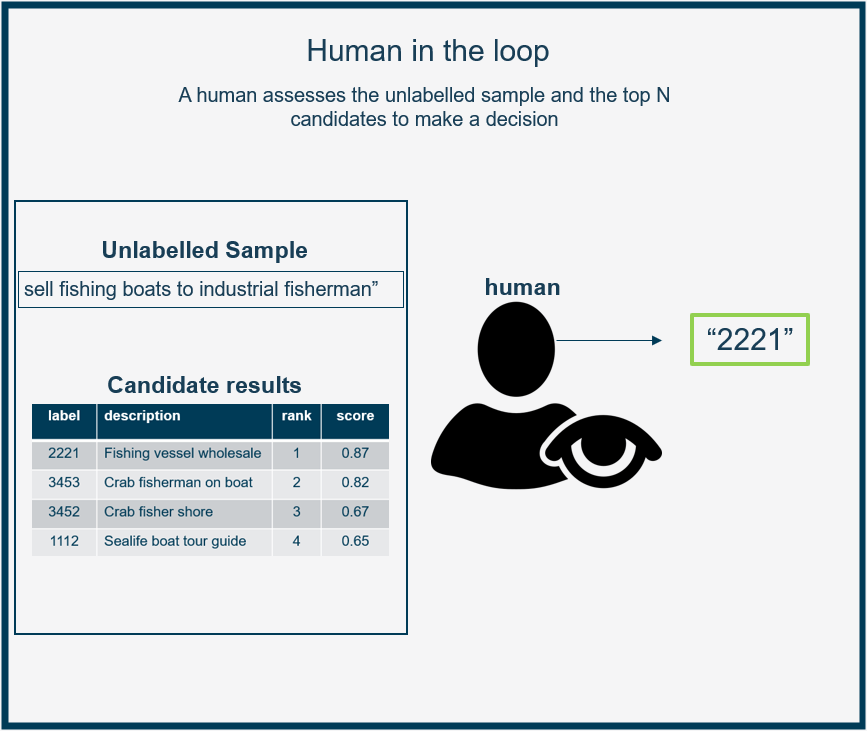
A human-in-the-loop approach where a human reads the candidate ranking list and unlabelled text to classify what the unknown label should be. This reduces the workload of the human who only need to assess the top k ranking, and not every knowledgebase entry.
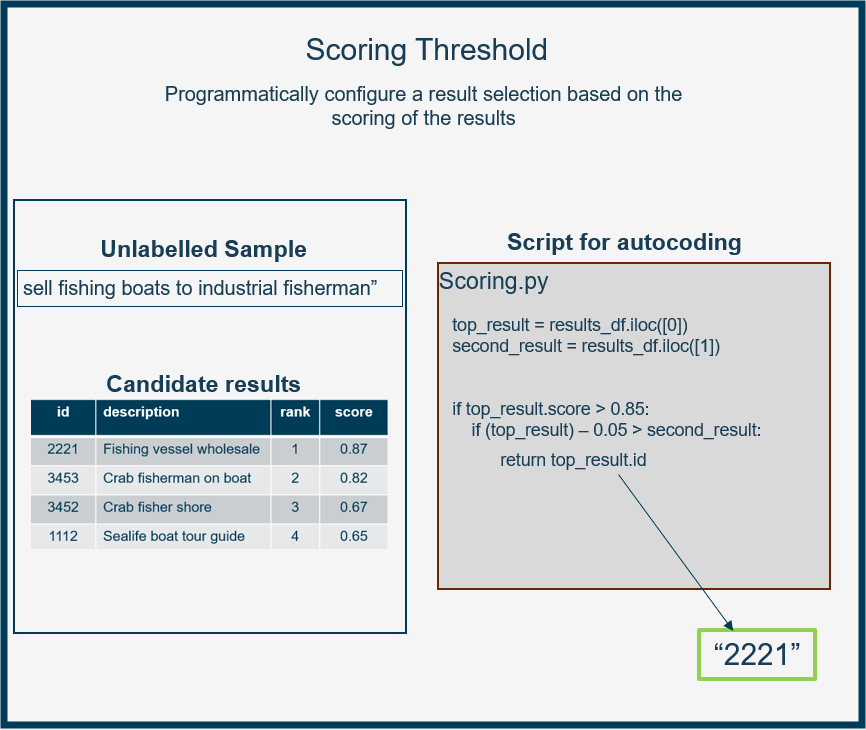
A scoring threshold that automatically selects the top ranked candidate. This is an efficient approach with minimal additional effort required - however it can lead to inaccurate results. This approach can be calibrated on existing results data.
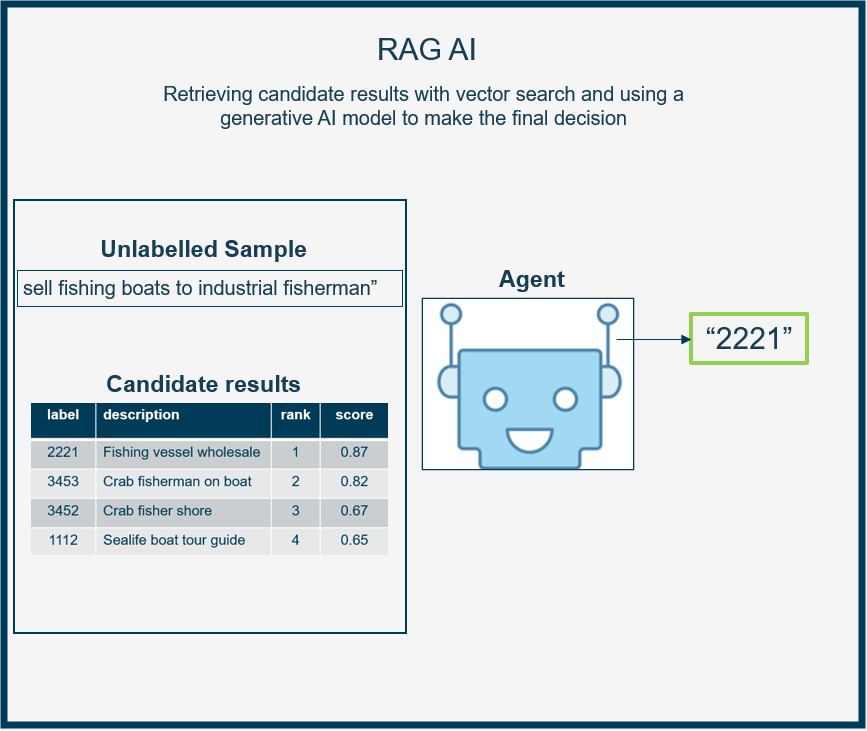
Using a designated AI model to make the final decision. In this notebook we showcase a RAG AI model utilising the candidate ranking as a set of retrieved results from ClassifAI and makes a final decision based on the information provided along with the original query
 |
 |
 |
|---|
KeyNote:
In this notebook we demonstrate an approach to strategy 3, using Google’s Gemini generative AI agent together with ClassifAI’s hooks functionality, to automatically classify ClassifAI candidate results with Generative AI.
We have built a pre-made hook class for Google AI agents that acts on the candidate results from the VectorStore to perform classification, and is flexible enough to perform other user specified tasks.
What is covered in this notebook:
This section including a overview, and prerequisite learning and requirements for this Notebook
A short overview of Generative AI in the context of ClassifAI
Setting up and using a
RagHook- a premade custom hook for ClassifAI to do classification onVectorStoresearch results with Google Gemini models and other tasks such as reranking and key word identification.
Required setup
This notebook is designed so that you can execute the code cells and follow along with the implementation. To do this you will need to:
Follow the install instruction in the DEMO readme section, installing the gcp optional extension for the ClassifAI package.
Ensure you have the fake_soc_dataset.csv demo data file downlaoded from the git repo -
DEMO/fake_soc_dataset.csvNote that you will need a Google Cloud Platform project set up - with the VERTEX AI API enabled to use Google’s Gemini models. You need a
project_id*
Additional learning resources
If you are unfamiliar with the basics of ClassifAI and the
VectorStore, we recommend you first study the demo notebookgeneral_workflow_demo.ipynb, this will give you an understanding of the processes used to obtain classification candidates for text sample with an unknown label.The AI agents explored in this notebook, are implemented as
VectorStoreHooks! Hooks modify the standard pipeline behavious, manipulating the inputs and output dataclasses of theVectorStore. Check out theusing_hooks.ipynbnotebook on this topic, if you are unfamiliar with hooks.
Retrieval Augmented Generation (RAG) with ClassifAI
This section provides an overview of Generative AI and its application to ClassifAI through Hooks
Broadly, Generative AI models accept some text as input, which can be in the form of an instruction, telling the model to generate some output text.
In ClassifAI we provide a pre-made hook that accoets as input and processes VectorStoreSearchOutput results objects. The pre-made hook is implemented in such a way that the behaviour of the AI can be modified by the package user by changing the instructions passed to the Generative AI hook on instantiation, affecting what the AI outputs.
Because the agent is operating on candidate results, it is convention to call this type of AI - Retrieval Augmented Generation - or RAG - where the agent is generating new content with a provided set of retrieved information, in our case VectorStoreSearchOuput results from the VectorStore search method.
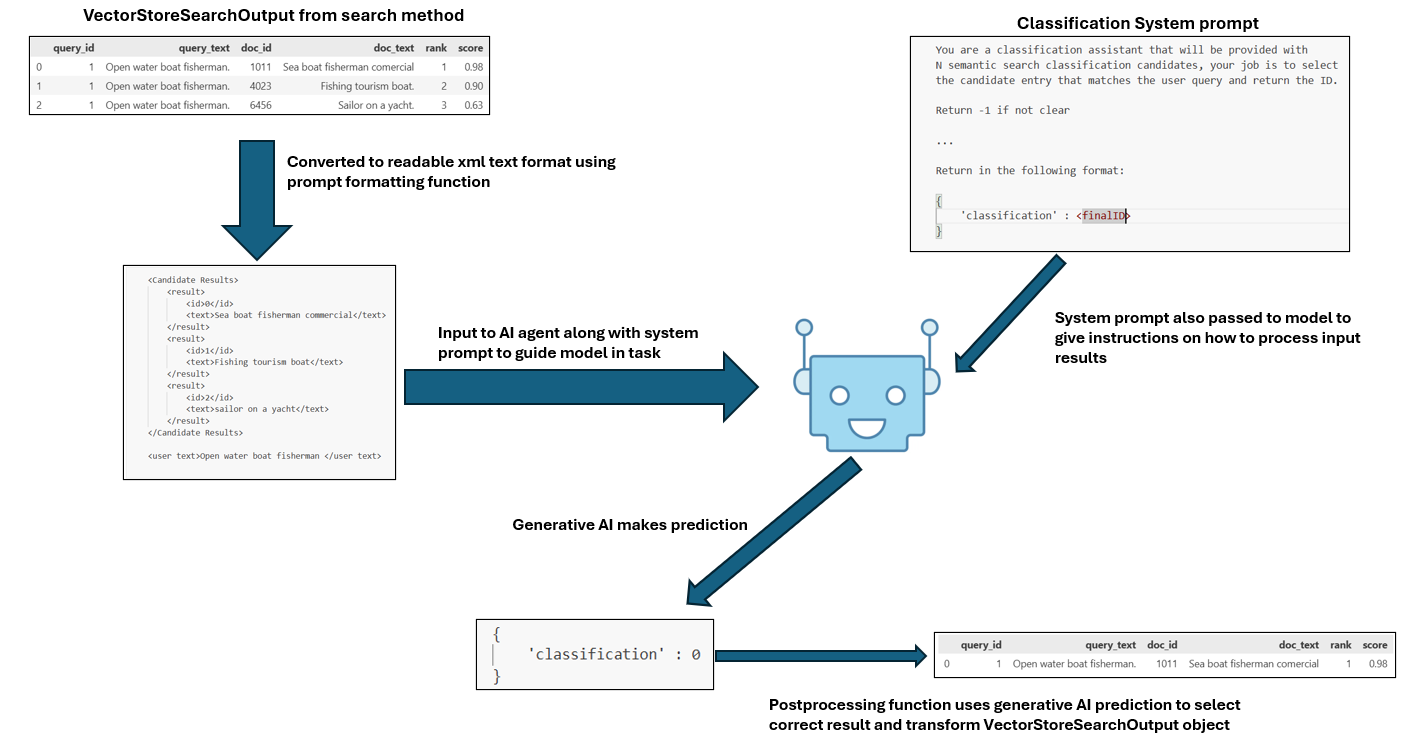
Below is an illustration of the components involved in our RAG hook, and how we pass several pieces of information to enable an AI model to make a final classification on ClassifAI search result data.
Generative AI models
Generative AI models are expensive to run, our proposed RagHook utilises the Google Gemini models which are accessed as a service through Gcloud APIs. Most generative AI models, from non-google organisations, follow similar architectures and can be used in a similar manner to how we use the Gemini model in this notebook.
Indeed the information in this section may guide the reader on how to implement their own custom AI RAG hook with another model or another style. We describe in the next few subsections the details of how we process VectorStore search results to pass to the Generative AI, use system instructions and format the output of the generative model. If you access to another Generative models API, or host your own, consider studying the open source code of our GitHub repository and writing your own Hook similar to our RagHook for Gemini.
https://docs.cloud.google.com/vertex-ai/generative-ai/docs/learn/overview
Pre-processing VectorStore data
Generative models take text as input and output new text. Some models are multimodal in that they can take images, video, audio and other mediums of data as input and generate output of the same kind.
In the case of our VectorStoreSearchOutput data that we want to the model to operate on in some way, this data is in the form of a pandas dataframe.
Within the RAG hook we:
- Provide the Generative AI with the schema of the dataframe and the dataframe information itself,
- Prepend some additional context data that describes the general task nature to the model.
See the Google Gemini GenAI documentation for more detail on our chosen model
System Instructions / Prompts
System instructions and prompts are essential for guiding generative AI models in processing input text and generating desired outputs. These instructions define the context, task, and expected response format, ensuring the model understands its role and produces structured, relevant results.
In the context of ClassifAI, system instructions are used to direct the model on how to process VectorStoreSearchOutput data. For example, we can instruct the model to classify, re-rank, or extract keywords from the retrieved results.
The System prompt is manually defined by the user when instantiating our RagHook, giving the user flexibility to define the task of the RAG model. This system prompt is passed as an argument when instatiating the RagHook, and the name of the argument is context_prompt.
See the next section for some example implentations of system prompts.
For more details on writing good system prompts generally, see the Google documentation
AI generation and structured outputs
Finally, generating “good” responses with generative AI model is essential for the RagHook to work. In general our design requires that the generative model can:
- Take the dataframe of per-query results of length N in as input
- Generate a list of result values where the list is equal to the length N of the results for the query.
- The generated list can then be assigned as an extra column (named ‘RAG Response’) of data in the
VectorStoreSearchOutputobject for that query.
While this constrains the use of the generative model to peform tasks that can be cast to a list-based form, it does integrate nicely with ClassifAI’s hook paradigm, where hooks are allowed to add extra columns to dataclass objects.
For example, a Classification RagHook will be instructed to output an list of integer values - all zeros except for the row that the AI believes is the correct classification row, where it will assign a value of 1. Corresponding to hook, the new data is output in a new dataframe column called RAG Response
To instruct the model to create a list formatted response, we allow the user to write a description of what that output should be and pass the description to the model. Similar to the context prompt from the previous section, this is passed as an argument on instantiaion and is named response_template.
As we will see in the section below, utilising context_prompt and response_template together, it is possible to create AI behaviour that performs many different tasks within a post-processing hook. And we encourage users to experiment with this feature of the RagHook.
For more information on more strict control of the model output, see the Google documentation.
Using the ClassifAI RagHook
This section provides example implementations and code using the RagHook for classification, reranking and keyword indentification.
In this section we will:
Show how the to instantiate a
RagHookin ClassifAI and use it with the VectorStoreDesign system prompts for different RAG tasks such as classification, reranking, and keyword identification.
Show the
RagHookin action, operating onVectorStoreSearchOutputresults to modify the result as is expected with Hooks.
It is important to note that in the section below the templates we use are examples.
You must customise these to their specific use cases, contexts and tasks.
Instantiating a RagHook for Classification
The RagHook is designed to be instantiated with two instructions for processing the results and geneating structured output:
context_prompt: Information that describes the task that the model is to perform with theVectorStoredata it is presented.response_template: Precise instructions on how the model should respond and what content to generate as a response list.
The next code cell below provides the instructions needed to perform classification on a VectorStoreSearchOutput result object.
To remphasise, for the RagHook to work the output must always consist of an array equal to the length of the per query result set. Observe in the example classification temple below - RESPONSE_TEMPLATE_CLASSIFICATION - how this is instructed, and we will see in the following subsections how this implementation choice can be used to perform many other tasks such as re-ranking and key word identification.
Note: you must set your GCP project ID, and authenticate to the project, in order to use the RAGHook
from classifai.vectorisers import GcpVectoriser

# setting project_id to access GCP APIs (SET BEFORE RUNNING CODE)
PROJECT_ID = "YOUR GOOGLE_CLOUD_PROJECT_ID"
# instatiate a vectoriser from Google thats required for the VectorStore to process text to embeddings
demo_vectoriser = GcpVectoriser(project_id=PROJECT_ID, vertexai=True)
Next, import and instantiate the RagHook passing the system instructions, and then attach it to a VectorStore.
from classifai.indexers import VectorStore
from classifai.indexers.hooks import RagHook

# instantiate the Rag hook agent first using the system prompts and api key for google cloud platform
classification_rag_hook = RagHook(
    project_id=PROJECT_ID,
    vertexai=True,
    context_prompt=CONTEXT_PROMPT_CLASSIFICATION,
    response_template=RESPONSE_TEMPLATE_CLASSIFICATION,
)

# instantiate the vector store, providing the rag hook agent and vectoriser as arguments and using one of the package's demo datasets
demo_vectorstore = VectorStore(
    file_name="./data/fake_soc_dataset.csv",
    data_type="csv",
    vectoriser=demo_vectoriser,
    hooks={"search_postprocess": classification_rag_hook},
    skip_save=True,
    quiet_mode=True,
)
Creating an input query and passing it to the VectorStore search method, the RAG agent will attempt to classify a correct final result in accordance with the provided system instructions.
from classifai.indexers.dataclasses import VectorStoreSearchInput

query_df = VectorStoreSearchInput({"id": [1, 2], "query": ["apple merchant", "pub landlord"]})
demo_vectorstore.search(query_df, n_results=5)
Above we should see that the output result dataframe has a new column, which contains a value of 1 where the classification is made per query, and 0 otherwise.
This highlights the way the RAG agent operates with ClassifAI - generating new data that can be represented as a new column in the output dataframe.
RagHook for re-ranking and other tasks
We can provide different kinds of system prompts (context_prompt and response_template) to get all sorts of different behaviours from the RagHook. So long as the output can be represented as a new column in the results dataframe, and that data remains valid under the dataclass rules then the user has the freedom to write whatever system prompts they like.
We showcase 2 additional designs that can be used:
Reranker Agent- The agent will assess theVectorStoreSearchOutputresults from theVectorStoresearch method and decide if any of the results should be re-ranked in a better order for the given query - the reranking stage only considers the top K documents already retrieved, not the whole set ofVectorStoredatabase entries.Keyword Indentification AgentThe agent is tasked with identifying a keyword from each retrieved document in theVectorStoreSearchOutputresults that is most relevant to the corresponding query.
ReRanker Agent
# RE-RANKING
CONTEXT_PROMPT_RERANKING = """You are an agent helping classify job descriptions.
Your task is to rank the retrieved documents for a given query in order of relevance.
You will receive a Pandas DataFrame, with a schema described in an Input Format
section, which is converted to JSON.
You must identify the row with the most relevant retrieved document.
When you have identified the most relevant row, respond strictly in the format described
in the Output Format section.
"""
RESPONSE_TEMPLATE_RERANKING = """
Respond ONLY with a list of boolean values the same length as the DataFrame you received -
in the list, put a "1" at the element corresponding to the most relevant row, "2" at the
next most relevant, and so on for all elements.
Make sure to avoid backticks, using only single or double quotes throughout.
Ensure the square brackets defining the list start and end your response, do not deviate
from this. Take the format of the example below as a strict guide.
Example (in the case where there are 5 rows, and the second is the most relevant):
["4","1","3","2","5"]
"""

# instantiate the Rag hook agent again, this time with the Reranker system prompt information.
reranker_rag_hook = RagHook(
    project_id=PROJECT_ID,
    vertexai=True,
    context_prompt=CONTEXT_PROMPT_RERANKING,
    response_template=RESPONSE_TEMPLATE_RERANKING,
)

# manually reassign the reranker_rag_hook to the vectorstore's search postprocess hook, so that it will be used when we call search again.
demo_vectorstore.hooks["search_postprocess"] = reranker_rag_hook

# when we call search again, the reranking system prompt will be used, and the output will be a relevance ranking rather than a classification.
query_df = VectorStoreSearchInput({"id": [1, 2], "query": ["apple merchant", "pub landlord"]})
demo_vectorstore.search(query_df, n_results=5)
Keyword Identification Agent
CONTEXT_PROMPT_KEYWORD_INDENTIFICATION = """You are an agent helping classify job descriptions.
Your task is to identify the keyword within each of the retrieved documents which is
most relevant to the given query.
You will receive a Pandas DataFrame, with a schema described in an Input Format
section, which is converted to JSON.
You must identify the most relevant keyword within each document text.
When you have identified the most relevant keyword, respond strictly in the format described
in the Output Format section.
"""
RESPONSE_TEMPLATE_KEYWORD_INDENTIFICATION = """
Respond ONLY with a single JSON string, which is a list of boolean values the same length as
the DataFrame you received - in the JSON list, there should be "keyword_1" as the first element
(where keyword_1 is in the first row's document text and is the most relevant to the query),
"keyword_2" as the next element, and so on for all elements.
Make sure to avoid backticks, using only single or double quotes throughout.
Ensure the square brackets defining the list start and end your response, do not deviate
from this. Take the format of the example below as a strict guide.
Example (in the case where there are 5 rows, and the query describes royalty):
["king","knight","throne","crown","castle"]
"""
# instantiate the Rag hook agent again, this time with the keyword identification system prompt information.
keyword_rag_hook = RagHook(
project_id=PROJECT_ID,
vertexai=True,
context_prompt=CONTEXT_PROMPT_KEYWORD_INDENTIFICATION,
response_template=RESPONSE_TEMPLATE_KEYWORD_INDENTIFICATION,
)
# manually reassign the keyword_rag_hook to the vectorstore's search postprocess hook, so that it will be used when we call search again.
demo_vectorstore.hooks["search_postprocess"] = keyword_rag_hook
# when we call search again, the keyword system prompt will be used, and the output will be a keyword list rather than a classification list or reranked list.
query_df = VectorStoreSearchInput({"id": [1, 2], "query": ["apple merchant", "pub landlord"]})
demo_vectorstore.search(query_df, n_results=5)That’s it! We’ve walked through:
How to use the
RagHookfor different tasks, tasks that can be defined by defining acontext_promptand aresponse_template.General guidance on the design implementation decisions for the
RagHookand related material for creating your own AI hook implementation.Full runninge examples of classification, reranking and keyword identification tasks.
Finally, consider checking out the RagHook in the default_hooks/post_processing.py file to see the exact implementation for different instantiation objects including: configuring a specific Google Cloud generative model (currently its defaults to Gemini-2.5-flash); changing which kind of dataclass object the generative model should work on; different ways of accessing the Gcloud API (with an API key for example); and general implementation documentation.